It's all based on your recipient policy. This is described very detailed in
285136 How to customize the SMTP e-mail address generators through recipient http://support.microsoft.com/?id=285136
However, there are couple things that are unclear in that article: what is alias, and where we get alias from?
When you create a new user, you are given the oppotunity to select an alias for the user, that alias is written into attribute "mailNickName". And mailNickName will be the first part of your primary smtp email address.
Then what will be the first part of the primary smtp address if we don't choose an alias? Your pre-Windows logon name, which corresponds to "samAccountName" will act as "mailNickName" by default.
Further to the post (Dec 6, 2006):
When will RUS consider a user object to be mailbox-enabled and try to stamp the other attributes?
Answer: Two attributes are needed: mailNickname + (msExchHomeServerName homeMDB homeMTA)
1. If the msExchHomeServer is not present, it is created based on the homeMDB or homeMTA, depending on which one is present.
2. After the msExchHomeServerName is set, the homeMDB and homeMTA attribute are populated if either one is missing.
3. The displayName is copied from mailNickname as is. The legacyExchangeDN goes through an algorithm that identifies the organization and administration group for the entry.
4. msExchMailboxGuid is created
Jul 13, 2005
Jun 10, 2005
How Windows applies Security Settings?
1. How Windows applies Security Settings?
Answer: I didn't find any documents on how and when the system loads security settings during boot or logon process. But as Security Template is imported into a Group Policy Object, the settings you defined in template become part of Group Policy. The final effective security settings for a GPO are written into GptTmpl.inf that under
%systemroot%\sysvol\sysvol\domain name\policies\GPO guid\machine\microsoft\windows\windows nt\secedit
System will compile all effective GPOs' GptTmpl.inf files into secedit.sdb under
%systemroot%\security\database
Please also keep in mind the following points:
- Security settings will be applied everytime its containing GPO is applied
- you can write a template but not to use it; similarily, you can create a GPO but not to link it anywhere
- Security Template itself is just a plain text file and has no effect on the computer. Therefore changing a template does not change any behavior unless you import this template into an EFFECTIVE GPO
- Once you import a Security Template into a GPO, system makes changes in GptTmpl.inf accordingly; If this is an effective GPO, the system will make changes into secedit.sdb then
- When the GPO is applied, the security settings are applied as they are just part of GPO now
- The "Computer Configuration" will be applied each time the computer boots; and the security settings are refreshed every 90 minutes on a workstation or server and every 5 minutes on a domain controller thereafter. The settings are also refreshed every 16 hours, whether or not there are any changes.
- An effective GPO is one that is linked to somewhere, it could be domain, site, OU, or local. And GPOs are applied in the order of local, site, domain, and OU whenever a computer boots into domain. Only Local Group Policy will be applied if it's a standalone server.
2. If templates are compared against security databases after every reboot what files are involved and how does the server know where to look for this information? this may relate to question 4. If this is not the case, how can I ensure that the server will use only a policy I have explicitly set.
Answer: It looks for secedit.sdb under the path mentioned in item 1 when the computer reboots.
If you make manual security settings changes, or import a security template into an effective GPO, the changes will be writen into secedit.sdb during the policy refresh cycle
3. Also in the folder c:/winnt/security/databases there are multiple sdb files. Is the server only looking for secedit.sdb file or will it read all *.sdb files in the database directory?
Answer: Only secedit.sdb. See also Answer 1 and 2.
Answer: I didn't find any documents on how and when the system loads security settings during boot or logon process. But as Security Template is imported into a Group Policy Object, the settings you defined in template become part of Group Policy. The final effective security settings for a GPO are written into GptTmpl.inf that under
%systemroot%\sysvol\sysvol\domain name\policies\GPO guid\machine\microsoft\windows\windows nt\secedit
System will compile all effective GPOs' GptTmpl.inf files into secedit.sdb under
%systemroot%\security\database
Please also keep in mind the following points:
- Security settings will be applied everytime its containing GPO is applied
- you can write a template but not to use it; similarily, you can create a GPO but not to link it anywhere
- Security Template itself is just a plain text file and has no effect on the computer. Therefore changing a template does not change any behavior unless you import this template into an EFFECTIVE GPO
- Once you import a Security Template into a GPO, system makes changes in GptTmpl.inf accordingly; If this is an effective GPO, the system will make changes into secedit.sdb then
- When the GPO is applied, the security settings are applied as they are just part of GPO now
- The "Computer Configuration" will be applied each time the computer boots; and the security settings are refreshed every 90 minutes on a workstation or server and every 5 minutes on a domain controller thereafter. The settings are also refreshed every 16 hours, whether or not there are any changes.
- An effective GPO is one that is linked to somewhere, it could be domain, site, OU, or local. And GPOs are applied in the order of local, site, domain, and OU whenever a computer boots into domain. Only Local Group Policy will be applied if it's a standalone server.
2. If templates are compared against security databases after every reboot what files are involved and how does the server know where to look for this information? this may relate to question 4. If this is not the case, how can I ensure that the server will use only a policy I have explicitly set.
Answer: It looks for secedit.sdb under the path mentioned in item 1 when the computer reboots.
If you make manual security settings changes, or import a security template into an effective GPO, the changes will be writen into secedit.sdb during the policy refresh cycle
3. Also in the folder c:/winnt/security/databases there are multiple sdb files. Is the server only looking for secedit.sdb file or will it read all *.sdb files in the database directory?
Answer: Only secedit.sdb. See also Answer 1 and 2.
May 31, 2005
What is SMB, NT LM, and Samba?
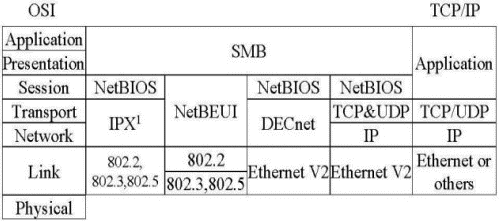
http://samba.anu.edu.au/cifs/docs/what-is-smb.html
Post with the permission of the author Richard Sharpe
==========================================================
On Tue, 14 Jun 2005, John Lan wrote:
> Hi Richard,>> First of all, thank you for a concise yet clear article on SMB at > http://samba.anu.edu.au/cifs/docs/what-is-smb.html>> Can I put it on my website http://strongline.blogspot.com/? Although > it's public accessible, it's mainly for my own use as an online notebook.>> Best regards,> John Lan
Sure, no problems.
Regards-----Richard Sharpe, rsharpe[at]richardsharpe.com, rsharpe[at]samba.org, sharpe[at]ethereal.com, http://www.richardsharpe.com/
May 16, 2005
High-watermark vector and Up-To-Dateness vector in depth
1. The up-to-dateness vector contains an entry for each domain controller that holds a full replica of the directory partition.
2. The high-watermark vector contains an entry for each domain controller that holds a full replica of the directory partition.
3. Each DC maintains its own, local only, Local USN, on each partition. In the mean time, each DC has a copy of originating USN table.
4. When an attribute is modified(added/removed ...), the local USN is increased by one and assigned to the attribute, the orginating DSA and originating USN are changed/assigned as well. Within an object, the highest USN of all attributes becomes the object's usnChanged, which is an attribute of an object
Note: The maping tables of attributes and USNs are stored locally on DC, they are not part of AD[After more research, I realized that this statement was wrong. Local USNs are stored in AD as well as a blob operational attribute, but you can't view them from normal LDAP]. However, usnChanged is part of an object. Keep in mind that the attribute "usnChanged" is not replicated therefore on different DCs it has different values.
Unlike Local USN, the originating USN/DSA will travel with the new attribute value when replication happens
5. When requested, source DC sends updates in increasing USN order to the destination DC, the destination DC will keep the USN(local to source dc) of the latest updates it receives from a specific DC/partition. This USN is called the High-Watermark to that particular DC/partition. It's guaranteed that object on source DC/partition that have a usnChanged value lower or equal to the High-Watermark have been replicated to Destination DC.
The above statement has two implication:
1) High-watermark is used to filter irrelevant objects from being considered when replication happens between two DCs
2) All High-Watermark values for different DC/partitions together is call High-Watermark vector. It contains value for only directly replication partners.
6. Up-To-Dateness vector is similar to High-Watermark vector except that it contains the highest originating USNs from all source DCs from which it ever gets updates. The source DC compares the Up-To-Dateness value(from Destination DC) to its local originating USN table to decide what attributes need to be replicated. In other words, is used to filter irrelevant attributes from being replicated
2. The high-watermark vector contains an entry for each domain controller that holds a full replica of the directory partition.
3. Each DC maintains its own, local only, Local USN, on each partition. In the mean time, each DC has a copy of originating USN table.
4. When an attribute is modified(added/removed ...), the local USN is increased by one and assigned to the attribute, the orginating DSA and originating USN are changed/assigned as well. Within an object, the highest USN of all attributes becomes the object's usnChanged, which is an attribute of an object
Note: The maping tables of attributes and USNs are stored locally on DC, they are not part of AD[After more research, I realized that this statement was wrong. Local USNs are stored in AD as well as a blob operational attribute, but you can't view them from normal LDAP]. However, usnChanged is part of an object. Keep in mind that the attribute "usnChanged" is not replicated therefore on different DCs it has different values.
Unlike Local USN, the originating USN/DSA will travel with the new attribute value when replication happens
5. When requested, source DC sends updates in increasing USN order to the destination DC, the destination DC will keep the USN(local to source dc) of the latest updates it receives from a specific DC/partition. This USN is called the High-Watermark to that particular DC/partition. It's guaranteed that object on source DC/partition that have a usnChanged value lower or equal to the High-Watermark have been replicated to Destination DC.
The above statement has two implication:
1) High-watermark is used to filter irrelevant objects from being considered when replication happens between two DCs
2) All High-Watermark values for different DC/partitions together is call High-Watermark vector. It contains value for only directly replication partners.
6. Up-To-Dateness vector is similar to High-Watermark vector except that it contains the highest originating USNs from all source DCs from which it ever gets updates. The source DC compares the Up-To-Dateness value(from Destination DC) to its local originating USN table to decide what attributes need to be replicated. In other words, is used to filter irrelevant attributes from being replicated
May 15, 2005
LocalSystem vs. Service Account
1. LocalSystem has not password and few privilege(as computer acccount), Service Account has the context of the domain account (Actually, LocalSystem does have a password just like your own account, but normally you don't have to worry about it)
2. Whenever you change password of a Service Account, you have to make change in the corresponding service properties via services console
3. LocalSystem on a DC has all rights against AD, so it's not recommended to use LocalSystem for starting a non-builtin service on DC
4. LocalSystem is subjected to remove when you remove the computer out of the domain, while Service Account remains in AD
2. Whenever you change password of a Service Account, you have to make change in the corresponding service properties via services console
3. LocalSystem on a DC has all rights against AD, so it's not recommended to use LocalSystem for starting a non-builtin service on DC
4. LocalSystem is subjected to remove when you remove the computer out of the domain, while Service Account remains in AD
May 10, 2005
ObjectCategory vs. ObjectClass in a Search Filter
copy from "Windows 2000 Resource Kits"
Because of the existence of the class inheritance hierarchy in the schema, every object in Active Directory is in fact a member of many classes ? four or five on the average. For this reason, the objectClass index is prohibitively large (for example, 4n, where n is the number of objects in the system). In addition, objectClass has poor selectivity for many possible class values. For example, a search filter of (objectClass=securityPrincipal) returns every user and group object in the system.
On the other hand, objectCategory usually refers to the most specific class in the object's class hierarchy. Although objectClass can have multiple values, the attribute objectCategory has only one. Every Active Directory object has an objectCategory attribute whose value is a classSchema object.
Every classSchema object has an attribute called defaultObjectCategory, which is the object category of an instance of the class if none is specified by the user. For most classes, the defaultObjectCategory value is the class itself. In the search filter, you can specify objectCategory=X, where X is the ldapDisplayName of a class, and LDAP automatically expands the filter to objectCategory=. The objectCategory attribute has a syntax of distinguished name, and LDAP automatically converts the value for objectCategory to the distinguished name format. For example, if you use objectCategory=contact in the filter, the filter changes to objectCategory=cn=person,cn=schema,cn=configuration,dc= ("person" is the defaultObjectCategory for the class contact).
Because of the existence of the class inheritance hierarchy in the schema, every object in Active Directory is in fact a member of many classes ? four or five on the average. For this reason, the objectClass index is prohibitively large (for example, 4n, where n is the number of objects in the system). In addition, objectClass has poor selectivity for many possible class values. For example, a search filter of (objectClass=securityPrincipal) returns every user and group object in the system.
On the other hand, objectCategory usually refers to the most specific class in the object's class hierarchy. Although objectClass can have multiple values, the attribute objectCategory has only one. Every Active Directory object has an objectCategory attribute whose value is a classSchema object.
Every classSchema object has an attribute called defaultObjectCategory, which is the object category of an instance of the class if none is specified by the user. For most classes, the defaultObjectCategory value is the class itself. In the search filter, you can specify objectCategory=X, where X is the ldapDisplayName of a class, and LDAP automatically expands the filter to objectCategory=. The objectCategory attribute has a syntax of distinguished name, and LDAP automatically converts the value for objectCategory to the distinguished name format. For example, if you use objectCategory=contact in the filter, the filter changes to objectCategory=cn=person,cn=schema,cn=configuration,dc= ("person" is the defaultObjectCategory for the class contact).
May 8, 2005
AD object naming formats and examples
<>
Several formats for providing object names are supported by Active Directory. These formats accommodate the different forms a name can take, depending on its application of origin. Active Directory administrative tools display name strings in a default format, which is the canonical name. The following formats are supported by Active Directory and are based on the LDAP distinguished name:
LDAP Distinguished Name.
LDAP v2 and LDAP v3 recognize the RFC 1779 and RFC 2247 naming conventions
cn=jsmith,ou=promotions,ou=marketing,dc=noam,dc=reskit,dc=com
LDAP Uniform Resource Locator (URL):
LDAP://server1.noam.reskit.com/cn=jsmith,ou=promotions,
ou=marketing,dc=noam,dc=reskit,dc=com
Active Directory Canonical Name:
noam.reskit.com/marketing/promotions/jsmith
Several formats for providing object names are supported by Active Directory. These formats accommodate the different forms a name can take, depending on its application of origin. Active Directory administrative tools display name strings in a default format, which is the canonical name. The following formats are supported by Active Directory and are based on the LDAP distinguished name:
LDAP Distinguished Name.
LDAP v2 and LDAP v3 recognize the RFC 1779 and RFC 2247 naming conventions
cn=jsmith,ou=promotions,ou=marketing,dc=noam,dc=reskit,dc=com
LDAP Uniform Resource Locator (URL):
LDAP://server1.noam.reskit.com/cn=jsmith,ou=promotions,
ou=marketing,dc=noam,dc=reskit,dc=com
Active Directory Canonical Name:
noam.reskit.com/marketing/promotions/jsmith
Apr 17, 2005
What is a Simple Bind
A user establishes a connection to a directory server by performing a bind operation. Part of the information that is used in performing this operation is the user's identity and password. There are three basic bind mechanisms ? anonymous, simple, or secure.
The simplest bind mechanism is an anonymous bind. Access is granted based on the user having no identity within the directory. While it is normal to provide read access to certain entries and attributes for anonymous users, most application data will be protected against retrieval by unknown users.
A simple bind operation is performed when the user provides a DN for an entry within the directory and a password that goes with that entry. The entry must have a USERPASSWORD attribute, which is checked against the password provided. If the bind is successful, the user's identity will become that DN for the duration of the connection and access to entries will be based on that identity.
While the simple bind is adequate for most environments, it requires that you send the password in clear text over the network. Some directory servers implement secure authentication methods, such as Kerberos or certificate-based authentication like SSL. Any authentication method that is used must resolve to a directory entry in order to permit a comparison with the access control list (ACL). After authentication, the ACL specifies access controls that are based on the DN for the user.
See original document at http://support.sas.com/rnd/itech/doc/ldap/ldapovew.html
The simplest bind mechanism is an anonymous bind. Access is granted based on the user having no identity within the directory. While it is normal to provide read access to certain entries and attributes for anonymous users, most application data will be protected against retrieval by unknown users.
A simple bind operation is performed when the user provides a DN for an entry within the directory and a password that goes with that entry. The entry must have a USERPASSWORD attribute, which is checked against the password provided. If the bind is successful, the user's identity will become that DN for the duration of the connection and access to entries will be based on that identity.
While the simple bind is adequate for most environments, it requires that you send the password in clear text over the network. Some directory servers implement secure authentication methods, such as Kerberos or certificate-based authentication like SSL. Any authentication method that is used must resolve to a directory entry in order to permit a comparison with the access control list (ACL). After authentication, the ACL specifies access controls that are based on the DN for the user.
See original document at http://support.sas.com/rnd/itech/doc/ldap/ldapovew.html
Apr 13, 2005
Do we need a GC or do we not when logging in?
Since the authenticating DC queries GC for the universal group membership, so the short answer would be YES. But a complete answer is
1) if it's a single domain environment, because each DC contains all information, a GC is not needed;
2) if there is not native domain, there is not universal group, therefore GC is not needed (for log in)
3) if you log on as local users, you don't even need DC; If you log on as Domain Admins, you don't need a GC to log in domain
4) if there is cached credential, you don't have to talk to a GC
Added 09/03/02
5) When user logs in using UPN, GC will be queried to determine the domain membership
6) if the group membership is cached on a local DC, client may not need to contact a GC
1) if it's a single domain environment, because each DC contains all information, a GC is not needed;
2) if there is not native domain, there is not universal group, therefore GC is not needed (for log in)
3) if you log on as local users, you don't even need DC; If you log on as Domain Admins, you don't need a GC to log in domain
4) if there is cached credential, you don't have to talk to a GC
Added 09/03/02
5) When user logs in using UPN, GC will be queried to determine the domain membership
6) if the group membership is cached on a local DC, client may not need to contact a GC
Apr 12, 2005
RestrictAnonymous Values
0: behavior same as before
1: Anonymous is a member of Everyone. Do not allow to enumerate of Sam database, but still has permissions that Everyone has
2: Anonymous is not a member of Everyone. Do not allow to enumerate of SAM database, and loses the permission that everyone used to have
1: Anonymous is a member of Everyone. Do not allow to enumerate of Sam database, but still has permissions that Everyone has
2: Anonymous is not a member of Everyone. Do not allow to enumerate of SAM database, and loses the permission that everyone used to have
Feb 23, 2005
Feb 7, 2005
High-Water Mark vector, Up-to-dateness vector, USN, and AD replication
see the following for what they are, how they work together
http://support.microsoft.com/servicedesks/webcasts/
en/wc020800/wct020800.asp?SD=gn&LN=en-ca&gssnb=1
http://support.microsoft.com/servicedesks/webcasts/
en/wc020800/wct020800.asp?SD=gn&LN=en-ca&gssnb=1
AD Object Permission Inheriting Behavior
================================
By default, permissions are inherited in AD. What it means is if you create a new object, it will get its ACLs from its parent container and the default ACL defined by schema for the class. For example, if "everyone" has "read" permission on an OU, then by default, "everyone" has "read" permission on any newly created downlevel OUs and objects.
You can change this behavior by clearing the checkbox "allow inheritable permissions....." on an AD object's properties windows, Security page. But as I said earlier, that box is checked on everything by default. If you delegate control to a group or a user on a specific level, the user/group is being delegated will automatically gets the same permissions against the downlevel objects.
So far everything what I have said should still make sense to you. And you would logically think that if you open the properties of an OU, add a user to have write permission, you should see that that user has write permission on downlevel objects. Surprisingly, that is not the case!
Hmm..., what is wrong here? So the inheriting model doesn't work anymore? Confusing, uh?
To understand all these, you have to understand that AD doesn't "copy" everything it has on one level to next level. It copies only "inheritable permissions" to downlevel. Then what is a "inheritable permission"?
If you click on Advance button on Security page, you will see the details of permissions on this object, each single entry(ACE) has an attribute of "this permission applies to", and the options are "this object only", "this object and the children", etc. Now you should have a kind of sense how it works, right? Change the type to be "this object and the children", you will eventually the permission you defined on this level will populate into downlevel object - as expected. And Delegation Control Wizard will take care of this for you.
By default, permissions are inherited in AD. What it means is if you create a new object, it will get its ACLs from its parent container and the default ACL defined by schema for the class. For example, if "everyone" has "read" permission on an OU, then by default, "everyone" has "read" permission on any newly created downlevel OUs and objects.
You can change this behavior by clearing the checkbox "allow inheritable permissions....." on an AD object's properties windows, Security page. But as I said earlier, that box is checked on everything by default. If you delegate control to a group or a user on a specific level, the user/group is being delegated will automatically gets the same permissions against the downlevel objects.
So far everything what I have said should still make sense to you. And you would logically think that if you open the properties of an OU, add a user to have write permission, you should see that that user has write permission on downlevel objects. Surprisingly, that is not the case!
Hmm..., what is wrong here? So the inheriting model doesn't work anymore? Confusing, uh?
To understand all these, you have to understand that AD doesn't "copy" everything it has on one level to next level. It copies only "inheritable permissions" to downlevel. Then what is a "inheritable permission"?
If you click on Advance button on Security page, you will see the details of permissions on this object, each single entry(ACE) has an attribute of "this permission applies to", and the options are "this object only", "this object and the children", etc. Now you should have a kind of sense how it works, right? Change the type to be "this object and the children", you will eventually the permission you defined on this level will populate into downlevel object - as expected. And Delegation Control Wizard will take care of this for you.
Feb 3, 2005
seemingly simple, namely "stupid", but hard-to-find-answer questions for beginners.
=========================================
More than often I was confused by a very basic concept that may be too simple for a guru but I just couldn't find a definite/clear answer ANYWHERE, and it slowed down my learning progress a lot. So, I am listing a few below, hoping that can help others who are experiencing similar problems.
1. do I have to have a MX record on my internal DNS for Exchange servers?
Answer: no. You don't. MX record is used only for people from Internet sending email to your organization.
2. Local Administrator, Domain Administrator, Administrators, and Domain Admins
1). "Administrator" is a built-in account that you can't disable/delete but can rename
2). If you are in a domain, you will have both "domain\administrator" and local "computer$\administrator" account. The one you see in Active Directory Users and Computers is domain administrator, while the one you see in Local Users and Groups is local Administrator. Note: on a Domain Controller, there is not Local Users and Groups anymore, and you will use only the one you see in ADUC, which is domain administrator (having local administrator permissions at the same time)
3). "Administrator" is not the same as LocalSystem
4). "Administrators" is a built-in local group for local administrators. "Domain Admins" is a built-in group for domain administrators.
5). By default, member of "domain admins" is also member of local "administrators"
6). You can put any one into "domain admins" and "administrators", they then get the permissions respectively
More than often I was confused by a very basic concept that may be too simple for a guru but I just couldn't find a definite/clear answer ANYWHERE, and it slowed down my learning progress a lot. So, I am listing a few below, hoping that can help others who are experiencing similar problems.
1. do I have to have a MX record on my internal DNS for Exchange servers?
Answer: no. You don't. MX record is used only for people from Internet sending email to your organization.
2. Local Administrator, Domain Administrator, Administrators, and Domain Admins
1). "Administrator" is a built-in account that you can't disable/delete but can rename
2). If you are in a domain, you will have both "domain\administrator" and local "computer$\administrator" account. The one you see in Active Directory Users and Computers is domain administrator, while the one you see in Local Users and Groups is local Administrator. Note: on a Domain Controller, there is not Local Users and Groups anymore, and you will use only the one you see in ADUC, which is domain administrator (having local administrator permissions at the same time)
3). "Administrator" is not the same as LocalSystem
4). "Administrators" is a built-in local group for local administrators. "Domain Admins" is a built-in group for domain administrators.
5). By default, member of "domain admins" is also member of local "administrators"
6). You can put any one into "domain admins" and "administrators", they then get the permissions respectively
Feb 2, 2005
what is userenv.dll?
When you are troubleshooting logon or Group Policy issues, you will very likely see event ID coming from userenv in your system log. What is userenv then?
Userenv.dll is a the Group Policy Engine that applies policies to your computer and your account. It calls different client-side extension to process different portion of your group policy. The most common CSE's include registry(administrative templates), security templates, folder redirection, software restriction, and so on.
Each CSE has a corresponding DLL to process the settings except registry CSE, which is process by userenv.dll itself.
If there is something wrong with your Group Policy application, possible causes include name solution not working, AD replication broken, FRS replication broken, and/or permission issue, you are very likely to see error reported from source "userenv" in Application Log.
To troubleshoot this kind of error, besides reviewing Event Viewer and collecting other basic information, most of the time you will need to enable User Environment debugging level to get more details.
Key: HKEY_LOCAL_MACHINE\Software\Microsoft\Windows NT\CurrentVersion\Winlogon Value: UserEnvDebugLevel
Value Type: REG_DWORD
Value Data: 10002 (Hexadecimal)
Userenv.dll is a the Group Policy Engine that applies policies to your computer and your account. It calls different client-side extension to process different portion of your group policy. The most common CSE's include registry(administrative templates), security templates, folder redirection, software restriction, and so on.
Each CSE has a corresponding DLL to process the settings except registry CSE, which is process by userenv.dll itself.
If there is something wrong with your Group Policy application, possible causes include name solution not working, AD replication broken, FRS replication broken, and/or permission issue, you are very likely to see error reported from source "userenv" in Application Log.
To troubleshoot this kind of error, besides reviewing Event Viewer and collecting other basic information, most of the time you will need to enable User Environment debugging level to get more details.
Key: HKEY_LOCAL_MACHINE\Software\Microsoft\Windows NT\CurrentVersion\Winlogon Value: UserEnvDebugLevel
Value Type: REG_DWORD
Value Data: 10002 (Hexadecimal)
Jan 28, 2005
Kerboros Authentication in Windows 2000/2003 Environment
===============================================
logging on
===============================================
logging on
=========
1. both DC and workstation use the same one-way algorithm to encrypt authenticator
2. user logs on workstation, the workstation composes two authenticators, one un-encrypted, one encrypted by the algorithm in step 1 using typed password as a key
3. workstation sends these two authenticators to DC
4. DC descrypts the encrypted authenticator, if the user has typed in a correct password in step 2, then DC will have a decrypted version of authenticator that is the same as the other copy sent by workstation in step 3
5. now the DC checks the timestamp against its authenticator history list, if it finds a match, then the log on is rejected
6. DC generates two TGTs that contain session key. One TGT is encrypted with a user's encrypted passwod, the other encrypted by DC's private key. TGT contains this user's Security Token(user's SID and its group's SID's)
7. DC sends two copies of encrypted TGTs to workstation, workstation stores both in non-paged pool memory
8. log on process finishes
Accessing Resources
==============
9. user/workstation wants to access a resource on another server
10. workstation gets the session key from TGT
11. workstation generates a "request ticket", encrypts it with session key
12. workstation sends the encrypted request ticket (from step 11) to KDC
13. workstation also sends a TGT back to KDC, KDC decrypts TGT with its own private key to get the session key from TGT
14. KDC now can use session key to decrypt the request ticket
15. KDC generates a new ticket (two copies) that contains the user's Security Token and a random key. one is encrypted with session key, the other is encrypted with the resource server's password (let's call them Access Ticket)
16. KDC sends two copies of new tickets back to workstation.
17. workstation decrypts one copy by using session key, and gets the random key(from step 15)
18. workstation composes a Resource Request, encrypts it with the random key
19. workstation then sends the other Access Ticket and the Resource Request to the target serverNote. because only the target server knows the password to decrypt the Access Ticket, the client is assured of a connection to its intended server. this is another advantage of Kerboros
20. the resource server uses its own password to decrypt the Access Ticket, gets the random key from Access Ticket
21. the resource server uses the random key to decrypt the Resource Request
22. the resource server process the Resource Request normally (checking the permissions against the Security Token)
Additional Reading
============
TechNet Home>Products&Tech>Server Operating Systems>Windows 2000 Server>Deploy>Configure Specific Features>Windows 2000 Kerberos Authentication
An very good article includes not only windows-specific kerberos info, but also a general briefing of how Kerberos was developed/why it's developed this way
Jan 12, 2005
VSS vs. Exchange Backup and Restore
1. the smallest unit can be backed up by using VSS is Storage Group
2. VSS can only make Full Backup or Copy
3. requestor: normally backup software, which requests to create a shadow copy Note: Windows NTBackup utility doesn't support VSS against Exchange yet
writer: the database application itself, such as Exchange, SQL Server, AD
provider: the hardware or software vendor actually provide VSS function
4. Virtual Disk Service(VDS): a universal API for different providers
5. ExWriter.dll is Exchange 2003's writer
6. Exchange system manager is required on the backup server as the backup server will have to verify
the integrity of the backup by using eseutil
7. VSS is not a replacement of routine backup, but a improvement of doing backup8 VSS cannot use RSG
will add more content to this post later...
1. the smallest unit can be backed up by using VSS is Storage Group
2. VSS can only make Full Backup or Copy
3. requestor: normally backup software, which requests to create a shadow copy Note: Windows NTBackup utility doesn't support VSS against Exchange yet
writer: the database application itself, such as Exchange, SQL Server, AD
provider: the hardware or software vendor actually provide VSS function
4. Virtual Disk Service(VDS): a universal API for different providers
5. ExWriter.dll is Exchange 2003's writer
6. Exchange system manager is required on the backup server as the backup server will have to verify
the integrity of the backup by using eseutil
7. VSS is not a replacement of routine backup, but a improvement of doing backup8 VSS cannot use RSG
will add more content to this post later...
Subscribe to:
Posts (Atom)