Search This Blog

Nov 7, 2025

Kerberoasting simple facts


Prerequisites for possible attack

  1. Attacker already possess an account in domain
  2. Attacker has access to KDC
  3. Targeted account must have SPN


Attack path:

  1. Attacker logs in with account A
  2. Attacker request TGS against account B that has SPN, using SPN to obtain ticket
  3. Attacker dumps the ticket and crack it offline
  4. Attacker knows password of user B


Prevention:

  1. Strong passwords
  2. Disable RC4 encryption support for Kerberos tickets (this can be done on DC side and/or user account side)
    1. On DCs, use GPO to disable RC4 support “Security Options -> Network security: Configure encryption types allowed for Kerberos”
    2. On user account, attribute msDS-SupportedEncryptionsTypes
  3. Normal account should NOT have SPNs
  4. Use gMSA so password is random and strong


Detection:

  1. Spikes in EventID 4769 for same SPN
  2. Spikes in EventID 4769 from a normal user account

Jun 26, 2025

Entra ID extension attributes

 There are 4 types of extension attributes

  1. Extension attribute 1-15. This is a legacy borrow from on-prem extension attribute introduced by Exchange
  2. Directory Extension (tied to an application, but can be consumed by other applications)
  3. Schema Extension (tenant-wide)
  4. Open Extension
Please see https://learn.microsoft.com/en-us/graph/extensibility-overview

How to include "directory extension attribute" (type #2 above) in claims

  1. need to use Graph API to create claim mapping policy
  2. use below POST command and  JSON body of the Graph call

POST https://graph.microsoft.com/v1.0/policies/claimsMappingPolicies
{
  "definition": [
    "{ 
      \"ClaimsMappingPolicy\": {
        \"Version\":1,
        \"IncludeBasicClaimSet\":\"true\",
        \"ClaimsSchema\": [
          {
            \"Source\":\"user\",
            \"ID\":\"extension_hostingAppID_deviceID\",
            \"JwtClaimType\":\"deviceID\"
          }
        ]
      }
    }"
  ],
  "displayName": "IncludeDeviceID",
  "isOrganizationDefault": false
}
  1. Make a note of returned policy ID for steps followed
  2. make a POST call as below to assgin the policy to consuming app
command: POST 
https://graph.microsoft.com/v1.0//servicePrincipals/{id}/claimsMappingPolicies/$ref

            where ID is objectID of SPN 

      Body
      {
        "@odata.id": "https://graph.microsoft.com/v1.0/policies/claimsMappingPolicies/policyID"
      } // where id is policy ID
    1. Pay attention to different GUID used. In the actual policy, appID of hosting app is used(remove dashes); In POST command, objectID of consuming app is used
    2. Last step, enable app to accept custom claim
    PATCH https://graph.microsoft.com/v1.0/applications/{objID of app}
    Content-type: application/json

    {
      "api": {
        "acceptMappedClaims": true,
        "requestedAccessTokenVersion": 2
      }
    }


    Jun 2, 2025

    Add Google as IdP for Entra applications

     External IDP (e.g.Google) | Application (e.g. Azure Entra)

    ------------------------- | ------------------------------

    create an app in google dev console | Configure Google as IdP

    gets client ID ---> | fill in client ID

    gets client secrect ---> | fill in client secrect

    fill in redirect URIs | <--- Find URIs from MS official website

    After above, google can be added as an IdP in user flow.


    reference:

    https://learn.microsoft.com/en-us/entra/external-id/customers/how-to-google-federation-customers

    Mar 14, 2025

    Running AD cmdlets within foreach parallel script block


     Powershell's parallel foreach script block runs in its own runspace so anything defined outside of the block is not visible in it. A few steps to make AD cmdlets work:


    1. Import activedirectory module within the block. It may throw warning "Error initializing default drive", which can be safely ignored but you will have to specify DC to establish connection via -server parameter in get-ad* cmdlets
      1. get-aduser -server "DC1.foobar.com" -.....
    2. The runspace won't have your credential from main session either so you have to transfer credential explicitly into script block

      $cred = get-credential
      $users | foreach -parallel {
            get-aduser -identity $_.samAccountName -credential $using:cred
      }
    3. If there are too many concurrent connections to AD, some connections may fail. Tweak to find the ThrottleLimit that works for you. 
    4. Use inputObject to return result ---> This is very handy as other ways to return value is complicated
      $_ | add-member -notepropertyname "pn" -notepropertyValue "pv"
    5. Putting it altogether
      $cred = get-credential
      $users | foreach -parallel {
            import-module ActiveDictory
            $u=get-aduser -identity $_.samAccountName -credential $using:cred
            $_ | add-member -NotePropertyName "DN" -NotePropertyValue $u.distinguishedName
      } -ThrottleLimit 5

    [UPDATE]

    So limiting the number of threads is not ideal, with the number as long as 2, there is still chance where connection be refused by DC, not to mention we lost most of benefit if the number is too low.

    One workaround is to make sure only one runspace connects to a particular DC at a time. This can be achieved by using a file as a lock. First get list of all DCs in a domain, then when a connection is made to a DC, obtain an exclusive handle to a file that represents the DC (e.g. "dc01.lock"). Once finish access the DC, release the lock file.

    # Acquire lock before connecting to a DC
    $server = $null
    while ($null -eq $server){                   
      foreach ($DC in $using:dcs) {
        try {
              $lockFile = [system.io.file]::open("c:\temp\$($DC).lock",
                             'OpenOrCreate','ReadWrite','None')
              $server = $DC
              break
        }catch{                }
    }
    if($null -eq $server) {Start-Sleep -Milliseconds 50}
    }
    try {
        get-aduser -server $server ....

        # Release lock
        $lockFile.close()
        remove-item "c:\temp\$($server).lock" -force -erroraction silentlyContinue
       
    }catch {}


    There are other ways to implement a lock, such as described in Dave's blog, but above file lock works very well and is less complicated.

    Jan 14, 2025

    Why it's so easy to confuse between OAuth and OpenID Connect

     OAuth is an authorization protocol that wasn't designed for authentication. All it gets ( and cares) is an access token from resource server that gives it access to certain resources. Technically it doesn't know (and it doesn't need to know) the owner behind those resources. 

    The reason that OAuth often seems to be an authentication protocol - and tons of applications do use it for authenticatino purpose - is that in all use cases of OAuth, the resource it was granted access to almost always contain something that can be used/seen/considered as an piece of ID, such as an email address. However, strictly speaking, just because the client (requestor) has obtained an email (or other ID-related info), it shouldn't assume it as a true identity.  

     For true authentiction, applications should use OpenID Connect, which is just an extension of OAuth. The extension provides an ID token instead of an access token.

    Apr 29, 2024

    What is "alias" type in whoami output?

     You probably noticed that besides "well-known group" and "group" in the output of whoami /all command, there is also another type called "alias". There was much result in googling to tell what this exactly is.

    After much searching, find this document: SAM Remote Protocol - not that kind of doc you'd think of for the question we have above. Anyhow, even info in this doc is obscure: 

    alias object: See resource group

    then:

    resource group: A group object whose membership is added to the authorization context only if the server receiving the context is a member of the same domain as the resource group.

    Translation:

    An alias is a domain local group from same domain as the resource server where it receives the context

    Feb 28, 2024

    AzureAD module for Graph Notes

    1.  How to install AzureAD module without internet connection
      1. Download nupkg file from PowerShell Gallery
      2. for module that has dependences, you can download all nupkg files into same folder
      3. copy nupkg file to a dedicated folder
      4. Assuming you have NuGet available, run "Register-PSRepository -Name <pickAName4YourRepository> -SourceLocation <absolute path to nupkg file>"
      5. You can now "find-module -repository <repositoryName>"
      6. "Install-Module -Name <moduleName>"
      7. placeholder
    2. Install modules behind company proxy
      1. run below as admin
      2. [System.Net.WebRequest]::DefaultWebProxy.Credentials = Get-Credential
      3. [Net.ServicePointManager]::SecurityProtocol = [Net.SecurityProtocolType]::Tls12
    3. ODATA filter syntax
      1. Get-AzureADUser -Filter "proxyAddresses/any(c:c eq 'smtp:user@domain.com')"
      2. Get-AzureADUser -Filter "Department eq 'HP'"
      3. Get-AzureADDirectoryROle -filter "DisplayName eq 'application administrator'"
      4. Find reference on Oasis website
      5. placeholder
    4. Connect to graph behind proxy
    # [NOTE] Set up proxy. Below works for PS 5
    [System.Net.WebRequest]::DefaultWebProxy.Credentials = Get-Credential
    [Net.ServicePointManager]::SecurityProtocol = [Net.SecurityProtocolType]::Tls12


    # Powershell 7 is using [System.Net.HttpWebRequest]::DefaultWebProxy instead of [System.Net.WebRequest]
    [System.Net.HttpWebRequest]::DefaultWebProxy = New-Object System.Net.WebProxy($null)  
      # this may work in companies where it can authenticate automatically
    [System.Net.HttpWebRequest]::DefaultWebProxy.Credentials = Get-Credential
    # Prompt for credential in companies that needs authN to use proxy

     [System.Net.HttpWebRequest]::DefaultWebProxy.Credentials = [System.Net.CredentialCache]::DefaultNetworkCredentials 

    # this can be used when proxy uses your default credential (it could be your domain credential, it could be your Azure cendenital, depending on your environment)

    1. placeholder

    Jan 31, 2024

    [PowerShell] When ExpandProperty is not good enough

    The ExpandProperty parameter in select-object cmdlet is useful to view full values of a compound property (e.g. when a property's value is an array or an object). However the limitation is also obvious. It accepts only one property, so we are forced to write a script block to process all results, using a different way to convert/expand properties one by one, before we can finally assembly the output.

    The other way to do it is to use inline expression. See below

    $targetedProperties=@(
        samaccountname,
        @{l='membership'; e={$_.memberof}}
        @{l='allEmailAddresses'; e={$_.proxyAddresses}}
    $uObj = get-aduser 'johnDoe' -properties *
    $expandedObj = $uObj | select $targetedProperties


    Array that includes most meaningful AD attributes for admins


    $meaningfulP = @(
        "AccountExpirationDate"
        #"accountExpires" # above converted value is readable to human - blank means never
        "AccountLockoutTime"
        "AccountNotDelegated"
        "AllowReversiblePasswordEncryption"
        #"BadLogonCount" # these are temporary values that are reset by AD periodically
        #"badPasswordTime"
        #"badPwdCount"
        "c"
        "CannotChangePassword"
        "CanonicalName"
        "City"
        "CN"
        "co"
        "codePage"
        "Company"
        "Country"
        "countryCode"
        "Created"
        "createTimeStamp"
        "Deleted"
        "Department"
        #"departmentNumber"
        @{l="deptNumber";e={$_.departmentNumber}}
        "Description"
        "DisplayName"
        "DistinguishedName"
        "Division"
        "EmailAddress"
        "EmployeeID"
        "EmployeeNumber"
        "employeeType"
        "Enabled"
        "extensionAttribute12"
        "extensionAttribute14"
        "extensionAttribute2"
        "extensionAttribute3"
        "extensionAttribute4"
        "extensionAttribute5"
        "extensionAttribute6"
        "extensionAttribute8"
        "extensionAttribute9"
        "Fax"
        "GivenName"
        "HomeDirectory"
        "HomedirRequired"
        "HomeDrive"
        "HomePage"
        "HomePhone"
        "Initials"
        "instanceType"
        "isDeleted"
        "l"
        "LastBadPasswordAttempt"
        "LastKnownParent"
        "LastLogonDate"
        "legacyExchangeDN"
        "LockedOut"
        "lockoutTime"
        "logonCount"
        "LogonWorkstations"
        "mail"
        "mailNickname"
        "Manager"
        #"MemberOf"
        @{l='membership';e={($_.Memberof)[0..20]}} #to prevent this value to become too large to fit into Excel cell limit
        "MNSLogonAccount"
        "MobilePhone"
        "Modified"
        "modifyTimeStamp"
        "Name"
        "ObjectCategory"
        "ObjectClass"
        "Office"
        "OfficePhone"
        "Organization"
        "OtherName"
        "PasswordExpired"
        "PasswordLastSet"
        "PasswordNeverExpires"
        "PasswordNotRequired"
        "physicalDeliveryOfficeName"
        "POBox"
        "PostalCode"
        "preferredLanguage"
        "ProfilePath"
        "ProtectedFromAccidentalDeletion"
        #"proxyAddresses"
        @{l='allEmailAddr';e={$_.proxyAddresses}}
        "SamAccountName"
        "sAMAccountType"
        "ScriptPath"
        "sDRightsEffective"
        #"ServicePrincipalNames"
        @{l='SPN';e={$_.ServicePrincipalNames}}
        "SmartcardLogonRequired"
        "sn"
        "st"
        "State"
        "StreetAddress"
        "Surname"
        "targetAddress"
        "Title"
        "TrustedForDelegation"
        "TrustedToAuthForDelegation"
        "UseDESKeyOnly"
        "userAccountControl"
        "UserPrincipalName"
        "whenChanged"
        "whenCreated"
    )

    Dec 2, 2023

    Typescript with VS code notes

    IDE related

    IDE - launch profile

    1. To add a different launch profile (i.e. run same source file with different settings, or specify a different start script etc.). Open launch.json file in editor, click on "Add Configuration" button. Resulting file below
          // Sample launch.json
          "version": "0.2.0",
          "configurations": [
              {
                  "type": "node",
                  "request": "launch",
                  "name": "Run Dist/index.js",
                  "program": "./dist/index.js",
                  "envFile": "${workspaceFolder}/.env",
                  "outFiles": [
                      "${workspaceFolder}/**/*.js"
                  ]
              },
              {
                  "type": "node",
                  "request": "launch",
                  "name": "Run testSMS.js",
                  "program": "./dist/testSMS.js",
                  "envFile": "${workspaceFolder}/.env",
                  "outFiles": [
                      "${workspaceFolder}/**/*.js"
                  ]
              }
          ]
      }
    2. Select a launch item to run
      1. Click "Run & Debug" button
      2. at top left corner, click on dropdown list besides green triangle, it should list 2 launch items listed in above sample file, one called "run index.js", the other called "run testsms.js".
      3. Select either one to run
    3. Any environment variables you specified in envFile above, you will have to define them as well in other running environments. For example, if you run the script from command line using "node.exe" then you have to "set env variables". If run in Azure app service, it should be defined under app service, configuration \ application settings section
    4. In launch.json, "type" could be "node" or "node-terminal" etc., it determines how/where screen output is sent. Using type=node together with below so outputs are sent to Debug console instead of Terminal console. Advantages of Debug console: filtering, setting breakpoint, coloring etc.
          "console": "internalConsole",            // <--- Force Debug Console
          "outputCapture": "std"                   // <--- Captures std out and err
    5. Bulletpoint placeholder
    Source code version control

    How to change code for a github project
    1. Click on the "source control" icon in left hand navigation bar (ctrl-shift-g)
    2. click "clone repository"
    3. select "clone from github(remote source code)"
    4. save it to a local folder
    5. You can run 'npx tsc' to compile

    6. Once finish coding, you can commit etc
    How to make a local copy of published module/library, modify/debug locally, then publish when done
    1. Make a local copy of the module and link to it
      1. in main app, "npm install moduleName", this will download and update dependency
      2. in module, run "npm link" //this link command is global, so you only need to make one local copy, and it's available machine wide. In all other places you need this module, just run next command "npm link moduleName"
      3. in main app, run "npm link moduleName"
    2. In module, once finish testing
      1. "npm ver #newVersionNumber" //Increase module version
      2. "npm publish"                             // publish to npm repository
      3. "npm unlink"                               // delete link
    3. In main app
      1. "npm unlink moduleName"        //disconnect link
      2. (optional) update package.json to use new module version
      3. "npm install moduleName"
      4. verify that new version is listed in package.json dependency section
    4. Other related commands
      1. npm ls -g --depth=0 --link=true  <To see linked library globally>
      2. npm ls --link=true                       <to see what's linked in your current project>
      3. npm ls grage-lib-jl                      <To see where a specific package is linked from>
    How to update a library (applies to scenarios where library is a separate rep and uploaded to npm)
    1. "npm install" to insall all dependant moudles
    2. Do NOT update the library source code in main program
    3. open a separate code window, make changes
    4. finish change and commit/sync
    5. "npm version patch" to update patch number. (or use other npm version  parameter to update minor version or major version)
    6. "npm publish" to publish it to NPM repository
    7. back to main program, 
      1. if package.json uses "^version#" in dependencies section, run "npm update", it should pull the latest version
      2. if package.json uses "version #" dependencies section, then edit the version# to be latest version, then remove library folder, and "npm install"

    Azure related

    Deploy
    1. With Azure extension setup, you can just right click on an Azure app, right click, "deploy" to deploy current project 
    2. Download deployment: 
      kudu zip api
    3. There are multiple ways an app can be deployed
      1. setup CI/CD in Azure app service
      2. setup github as external git source
      3. in github, set up Github Actions. This involves create a workflow yml file in which you can define with or without triggers. Sync triggers work same way as CI/CD pratically
    4. app name in workflow file must match what's in Azure
    5. If you have multiple package.json file in different folders that definds different dependencies for each folder, then "npm install" must be called in all folders. Define "npm install" and "npm build" in root package.json in such a way that it calls both in each sub-locations
    6. You need to define "engines" section with expected nodejs version in package.json file

    Typescript syntax

    1. import * from "./ws" means importing a file "ws.ts" under same folder
      import * fro "ws" means importing a 3rd party module called ws from node-module folder

    Nov 22, 2023

    Demo - Regex

    •  any string as is but a particular string: ^(?!particularString$).*
    • Grouped match (it will return named group, give a host FQDN, below will return domainName   ^.*?\.(?<domainName>.*)
    • Matches duplicate line ^((?-s).+?)\R(?=(?s).*?^\1(?:\R|\z))
    • AD domain NETBIOS name when standalone
      [a-zA-Z0-9](?!.*[,:~!@#\$%\^'\.\(\)\{\}_ \/\\]).{0,14}\\
    • SAMaccountName
      ^(?!.*[\"\/\\\[\]:;|=,\+\*\?<>]).{1,19}$
    • AD domain NETBIOS name when followed by \userName (this also groups domain/user)
      ([a-zA-Z0-9](?![^\\]*[,:~!@#\$%\^'\.\(\)\{\}_ \/]).{0,14})\\((?!.*[\"\/\\\[\]:;|=,\+\*\?<>]).{1,19})
    • same for powershell match
      -match '^    ([a-zA-Z0-9](?![^\\]*[,:~!@#\$%\^''\.\(\)\{\}_ \/]).{0,14})\\((?!.*[\"\/\\\[\]:;|=,\+\*\?<>]).{1,19})'
    • DN --> OU path (stripping CN name)
      -match '^((.+?),)(OU=.*|CN=.*)' $OUPath = $matches[3]

    Nov 20, 2023

    Azure AD: Risky User VS. Risky Sign-in


    Differences between “Risky Sign-In” and “Risk User”

    • Risky sign-in: abnormally in sign in activities, such as unusual location, impossible travels etc.
    • Risky user: An account that MS believes to have high probability of having been comprised (e.g. leaked credential)


    More importantly, the difference lies in how they are dealt with:

    • Risky Sign-in: requires additional authentication (e.g. MFA)
    • Risky User: Make old credential invalid (e.g. reset password)


    If we are to target “Risky Users”, Risky User Policy can be used to force password change. 


    Similarly, If we are to target “Risky Sign Ins”, we can use “Risky Sign in Policy” to enforce MFA.

    Nov 3, 2023

    Tracking AD authentications - what to audit, what to ignore

    Audit category "Logon/Logoff" means the actual logon/off activity where a session is established.
    Audit category "Account Logon/Logoff" means *authentication*. It's different from "logon/logoff", it's not "logon/logoff" 

    There are 2 places in Windows/AD environment where authentication can happen, 
    • locally to SAM database (NTLM), or 
    • against AD. 
    When a principal authenticates against AD, it could be NTLM or Kerberos. 
    [update] MS added 2 new features called "Local KDC" and IAkerb respectively. The former feature allows a local auth happens using Kerberos 


     You are going to see a lot of "logon/logoff" events either on member server, or on DC. 
    • When it's on member server, it could be local user or AD user established logon session after auth
    • When it's on DC - you should see DC same as a resource member server, because logon/logoff events happens when a user accesses it as client. You will see almost all AD users have logon events on DCs with type 3 (remote) because users need to access DC in various ways in domain - e.g., pulling GPO from SYSVOL folder 
    For the purpose of tracking user's "logon" activity into AD, you really want to track their "authentication" activity. You should ignore all "logon/logoff" events from DC because this is redundant. For any logon event there must be preceding authentication event. Auth event alone is enough to determine if a user has recent activity against AD. 

    This means to check only 4776-NTLM, 4768, Kerberos, see section below 
    • logon/off events
      • 4624 : logon
        Note: There are tons 4624 for all users on DC (logon type 3, remote) because user need to connect to SYSVOL etc. 
      • Related events 
        • 4634: log off (e.g. log off session from a remote server) 
        • 4647: user initiated logoff (e.g. in interactive console logoff) 
        • 4625: failed to logon 
        • 4672: special logon (local) 
        • 4648: local logon
    • AD auth events (a.k.a *Account* Logon/off events) 
      • 4776: If reported on DC, tried to validate credentials via NTLM. 
        • Fields to extract in Splunk:(when reported on local, SAM) 
          • user: user, or Logon_Account 
          • domain: dest|dest_nt_host, remove short host name final query: EventCode=4776 | regex user!=".*\$$" | rex field=dest "^.*?\.(?.*)"| strcat domain "\\" user ID 
      • 4768 Kerberos TGT validation: 
        • Field to extract in Splunk
          • user: user | Account_Name | src_user 
          •  domain: user_account_domain | dest_nt_domain 
        • Related events:
          • 4771: Kerberos pre-auth failed 
          • 4772: TGT request failed 
          • 4769 Kerberos Service Ticket requested (good for knowing what resource an account is accessing) 
          • 4770: ST renewed

    Sep 20, 2023

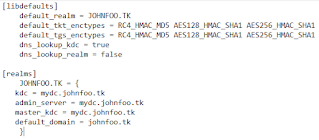
    Make a MIT Kerberos client on Windows

    Steps

    1. Compose krb5.conf file ( In windows, it's krb5.ini under %programfile%\MIT\Kerberos)
      1. concepts here
      2. samples here
        My sample file


      3. reference here
    2. Ktpass command to generate keytab file
      1. ktpass /out userName.keytab /mapuser userName@johnfoo.tk /princ http/serviceHostName.johnfoo.com@JOHNFOO.TK /pass <pwd> /crpto all /ptype KRB5_NIT_PRINCIPAL
    3. kinit to obtain ticket
      1. kinit -k -t userName.keytab http/serviceHostName.johnfoo.tk@JOHNFOO.TK
    4. klist to verify that ticket was issued successfully


    Aug 4, 2023

    Demo-parallel-foreach

     This requires PowerShell v7

    $sub=New-Object System.Collections.ArrayList
    $destSubs = [System.Collections.ArrayList]::Synchronized($sub)
    $allsubs=@(1,2,3,4,5)
    $externalVariable=3
    $AllSubs | Sort-Object -Property Name | ForEach-Object -Parallel {

        # Any external variable reference needs to be localized using "using"
        $localVariable = $using:externalVariable
        ($_ -lt $localVariable)

        # Obtain reference to the bag with `using` modifier
        $localCostsVariable = $using:destsubs

        # Add to bag
        $localCostsVariable.Add($_)
    }

    $destSubs
    write-host ""
    $sub


    # NOTE: many AD object properties won't be visible inside of a parallel script block.
    # Need to trigger PS AD adapter driver to populate the result set first
    # https://stackoverflow.com/questions/75851412/powershell-foreach-object-parallel-not-all-properties-of-piped-in-object-are-a
    #

    $users = get-aduser -filter $filter -properties samAccountName,lastLogonTimestamp
    #$users=$users|select *    # uncomment this line in order to make below work
    $users|foreach -parallel {
       [do something with $_.samAccountName]   # --> this works fine. samAccountName can be read properly
       [do something with $_.lastLogonTimestamp]    # --> this doesn't work. lastLogonTimestamp is always NULL regardless if it is actually populated
    
    }

    Jul 20, 2023

    MS Graph RESTful Queries

    1.  Links
      1. Graph Explorer
      2. MS Odata Document
      3. Oasis Odata v4.0.1 URL Conventions, specifically, pay attention to 
        1. URL components
        2. Resource path and how to address entities, properties etc.
        3. Query Options
    2. An Odata URL is consist of 3 parts


      1. root URL: GET request made to root URL returns service document (that defines all resources available via the service)
      2. resource path: Entity or entity sets that are accessible via RESTful API
      3. Query option: select, filter, count, skip, order, top etc. See next section 
    3. Addressing
      1. Getting entity set:    GET serviceRoot/users
      2. Getting individual entity by key:    GET serviceRoot/users('john.doe@example.com')
      3. Getting entity property    GET serviceRoot/users/displayName
      4. Getting entity property raw value:    GET serviceRoot/users/displayName/$value
      5. Getting entity set:    GET serviceRoot/users
      6. Getting entity set:    GET serviceRoot/users
      7. Addressing metadata in powershell: $obj.'@odata.type'
        The key here is that the dot (.) between "odata" and "type" is not denotation of a sub-property, but just a normal text character as part of the property name '@odata.type' (so we quote the whole string)
    4. Query options
      1. Filter:
        1. Filter operators: eq/ne/gt/ge/lt/le/and/or/not/has/in
        2. Filter functions: contains/startsWith/endsWith/indexOf/concat/subString
        3. Collection functions: hasSubset/hasSubsequence
        4. More functions on Oasis URL above
        5. Example #1:    GET serviceRoot/users?$filter=upn eq 'johnDoe@example.com'
        6. Example #2, filter against complex type. This query finds airports whose address contains "San Francisco", where address is a property of a complex type Location:    GET serviceRoot/Airports?$filter=contains(Location/Address, 'San Francisco')
        7. Example #3:    GET serviceRoot/users?$filter=upn in {upn1@x.com,upn2@x.com}'
      2. Expand:
        1. Navigation properties: any property that can link to another entity. For example, "memberof", "manager" property of a user
        2. Example #1:    GET serviceRoot/users?$filter=upn eq 'johnDoe@example.com'$expand=manager
        3. Example #2:    $uObj=get-mgUser ... -expandproperty manager; $uObj.manager.additionalProperties.displayName
        4. Example #3:    get-mgUser ... -expandproperty "manager(`$select=displayName,jobTitle)"
      3. Select:
        1. Example #1:    GET serviceRoot/users?$select=*
      4. OrderBy:
        1. Example #1:    GET serviceRoot/users?$expand=manager($orderby=department)
        2. Example #2, order by the count of members:    GET serviceRoot/groups?$orderby=members/$count
      5. Top/Skip/Count
      6. any/all operator
        1. GET serviceRoot/People?$filter=Emails/any(s:endswith(s, 'contoso.com'))
    5. Literals
      1. null/$it/$root/$this
    6. placeholder