Search This Blog

Nov 22, 2023

Demo - Regex

  •  any string as is but a particular string: ^(?!particularString$).*
  • Grouped match (it will return named group, give a host FQDN, below will return domainName   ^.*?\.(?<domainName>.*)
  • Matches duplicate line ^((?-s).+?)\R(?=(?s).*?^\1(?:\R|\z))
  • AD domain NETBIOS name when standalone
    [a-zA-Z0-9](?!.*[,:~!@#\$%\^'\.\(\)\{\}_ \/\\]).{0,14}\\
  • SAMaccountName
    ^(?!.*[\"\/\\\[\]:;|=,\+\*\?<>]).{1,19}$
  • AD domain NETBIOS name when followed by \userName (this also groups domain/user)
    ([a-zA-Z0-9](?![^\\]*[,:~!@#\$%\^'\.\(\)\{\}_ \/]).{0,14})\\((?!.*[\"\/\\\[\]:;|=,\+\*\?<>]).{1,19})
  • same for powershell match
    -match '^    ([a-zA-Z0-9](?![^\\]*[,:~!@#\$%\^''\.\(\)\{\}_ \/]).{0,14})\\((?!.*[\"\/\\\[\]:;|=,\+\*\?<>]).{1,19})'
  • DN --> OU path (stripping CN name)
    -match '^((.+?),)(OU=.*|CN=.*)' $OUPath = $matches[3]

Nov 20, 2023

Azure AD: Risky User VS. Risky Sign-in


Differences between “Risky Sign-In” and “Risk User”

  • Risky sign-in: abnormally in sign in activities, such as unusual location, impossible travels etc.
  • Risky user: An account that MS believes to have high probability of having been comprised (e.g. leaked credential)


More importantly, the difference lies in how they are dealt with:

  • Risky Sign-in: requires additional authentication (e.g. MFA)
  • Risky User: Make old credential invalid (e.g. reset password)


If we are to target “Risky Users”, Risky User Policy can be used to force password change. 


Similarly, If we are to target “Risky Sign Ins”, we can use “Risky Sign in Policy” to enforce MFA.

Nov 3, 2023

Tracking AD authentications - what to audit, what to ignore

Audit category "Logon/Logoff" means the actual logon/off activity where a session is established.
Audit category "Account Logon/Logoff" means *authentication*. It's different from "logon/logoff", it's not "logon/logoff" 

There are 2 places in Windows/AD environment where authentication can happen, 
  • locally to SAM database (NTLM), or 
  • against AD. 
When a principal authenticates against AD, it could be NTLM or Kerberos. 
[update] MS added 2 new features called "Local KDC" and IAkerb respectively. The former feature allows a local auth happens using Kerberos 


 You are going to see a lot of "logon/logoff" events either on member server, or on DC. 
  • When it's on member server, it could be local user or AD user established logon session after auth
  • When it's on DC - you should see DC same as a resource member server, because logon/logoff events happens when a user accesses it as client. You will see almost all AD users have logon events on DCs with type 3 (remote) because users need to access DC in various ways in domain - e.g., pulling GPO from SYSVOL folder 
For the purpose of tracking user's "logon" activity into AD, you really want to track their "authentication" activity. You should ignore all "logon/logoff" events from DC because this is redundant. For any logon event there must be preceding authentication event. Auth event alone is enough to determine if a user has recent activity against AD. 

This means to check only 4776-NTLM, 4768, Kerberos, see section below 
  • logon/off events
    • 4624 : logon
      Note: There are tons 4624 for all users on DC (logon type 3, remote) because user need to connect to SYSVOL etc. 
    • Related events 
      • 4634: log off (e.g. log off session from a remote server) 
      • 4647: user initiated logoff (e.g. in interactive console logoff) 
      • 4625: failed to logon 
      • 4672: special logon (local) 
      • 4648: local logon
  • AD auth events (a.k.a *Account* Logon/off events) 
    • 4776: If reported on DC, tried to validate credentials via NTLM. 
      • Fields to extract in Splunk:(when reported on local, SAM) 
        • user: user, or Logon_Account 
        • domain: dest|dest_nt_host, remove short host name final query: EventCode=4776 | regex user!=".*\$$" | rex field=dest "^.*?\.(?.*)"| strcat domain "\\" user ID 
    • 4768 Kerberos TGT validation: 
      • Field to extract in Splunk
        • user: user | Account_Name | src_user 
        •  domain: user_account_domain | dest_nt_domain 
      • Related events:
        • 4771: Kerberos pre-auth failed 
        • 4772: TGT request failed 
        • 4769 Kerberos Service Ticket requested (good for knowing what resource an account is accessing) 
        • 4770: ST renewed

Sep 20, 2023

Make a MIT Kerberos client on Windows

Steps

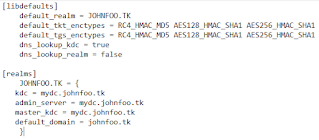
  1. Compose krb5.conf file ( In windows, it's krb5.ini under %programfile%\MIT\Kerberos)
    1. concepts here
    2. samples here
      My sample file


    3. reference here
  2. Ktpass command to generate keytab file
    1. ktpass /out userName.keytab /mapuser userName@johnfoo.tk /princ http/serviceHostName.johnfoo.com@JOHNFOO.TK /pass <pwd> /crpto all /ptype KRB5_NIT_PRINCIPAL
  3. kinit to obtain ticket
    1. kinit -k -t userName.keytab http/serviceHostName.johnfoo.tk@JOHNFOO.TK
  4. klist to verify that ticket was issued successfully


Aug 4, 2023

Demo-parallel-foreach

 This requires PowerShell v7

$sub=New-Object System.Collections.ArrayList
$destSubs = [System.Collections.ArrayList]::Synchronized($sub)
$allsubs=@(1,2,3,4,5)
$externalVariable=3
$AllSubs | Sort-Object -Property Name | ForEach-Object -Parallel {

    # Any external variable reference needs to be localized using "using"
    $localVariable = $using:externalVariable
    ($_ -lt $localVariable)

    # Obtain reference to the bag with `using` modifier
    $localCostsVariable = $using:destsubs

    # Add to bag
    $localCostsVariable.Add($_)
}

$destSubs
write-host ""
$sub


# NOTE: many AD object properties won't be visible inside of a parallel script block.
# Need to trigger PS AD adapter driver to populate the result set first
# https://stackoverflow.com/questions/75851412/powershell-foreach-object-parallel-not-all-properties-of-piped-in-object-are-a
#

$users = get-aduser -filter $filter -properties samAccountName,lastLogonTimestamp
#$users=$users|select *    # uncomment this line in order to make below work
$users|foreach -parallel {
   [do something with $_.samAccountName]   # --> this works fine. samAccountName can be read properly
   [do something with $_.lastLogonTimestamp]    # --> this doesn't work. lastLogonTimestamp is always NULL regardless if it is actually populated

}

Jul 20, 2023

MS Graph RESTful Queries

  1.  Links
    1. Graph Explorer
    2. MS Odata Document
    3. Oasis Odata v4.0.1 URL Conventions, specifically, pay attention to 
      1. URL components
      2. Resource path and how to address entities, properties etc.
      3. Query Options
  2. An Odata URL is consist of 3 parts


    1. root URL: GET request made to root URL returns service document (that defines all resources available via the service)
    2. resource path: Entity or entity sets that are accessible via RESTful API
    3. Query option: select, filter, count, skip, order, top etc. See next section 
  3. Addressing
    1. Getting entity set:    GET serviceRoot/users
    2. Getting individual entity by key:    GET serviceRoot/users('john.doe@example.com')
    3. Getting entity property    GET serviceRoot/users/displayName
    4. Getting entity property raw value:    GET serviceRoot/users/displayName/$value
    5. Getting entity set:    GET serviceRoot/users
    6. Getting entity set:    GET serviceRoot/users
    7. Addressing metadata in powershell: $obj.'@odata.type'
      The key here is that the dot (.) between "odata" and "type" is not denotation of a sub-property, but just a normal text character as part of the property name '@odata.type' (so we quote the whole string)
  4. Query options
    1. Filter:
      1. Filter operators: eq/ne/gt/ge/lt/le/and/or/not/has/in
      2. Filter functions: contains/startsWith/endsWith/indexOf/concat/subString
      3. Collection functions: hasSubset/hasSubsequence
      4. More functions on Oasis URL above
      5. Example #1:    GET serviceRoot/users?$filter=upn eq 'johnDoe@example.com'
      6. Example #2, filter against complex type. This query finds airports whose address contains "San Francisco", where address is a property of a complex type Location:    GET serviceRoot/Airports?$filter=contains(Location/Address, 'San Francisco')
      7. Example #3:    GET serviceRoot/users?$filter=upn in {upn1@x.com,upn2@x.com}'
    2. Expand:
      1. Navigation properties: any property that can link to another entity. For example, "memberof", "manager" property of a user
      2. Example #1:    GET serviceRoot/users?$filter=upn eq 'johnDoe@example.com'$expand=manager
      3. Example #2:    $uObj=get-mgUser ... -expandproperty manager; $uObj.manager.additionalProperties.displayName
      4. Example #3:    get-mgUser ... -expandproperty "manager(`$select=displayName,jobTitle)"
    3. Select:
      1. Example #1:    GET serviceRoot/users?$select=*
    4. OrderBy:
      1. Example #1:    GET serviceRoot/users?$expand=manager($orderby=department)
      2. Example #2, order by the count of members:    GET serviceRoot/groups?$orderby=members/$count
    5. Top/Skip/Count
    6. any/all operator
      1. GET serviceRoot/People?$filter=Emails/any(s:endswith(s, 'contoso.com'))
  5. Literals
    1. null/$it/$root/$this
  6. placeholder

Jul 14, 2023

Enabling SMS Communication Using Azure Communication Service

Recently adding SMS alerting function to a monitoring program that my son wrote. Below are high level steps for North America developers.


  1. Assuming you already have App Service Plan and App Service in Azure
  2. Request SMS service
    1. Search "Communication Service" -> "create" to create a communication service instance
    2. Once created, under "Phone numbers", request a phone number. 
      1. Only toll free number can send SMS messages
      2. Cost (as of July 2023): $2/month + per message cost (neglectable)
      3. You can also request short code ID or aliphatic ID for extra cost
  3. Submit request for SMS sending
    1. In same page of the communication service instance, under "Regulatory Documents", submit a request. 
    2. "opt-in type" refers to how "customers" (as the regulatory is designed around marketing SMS messages) opt-in/opt-out. It could be SMS, web portal, paper form, etc. You have to provide evidence(screenshot) that there is such opt-in option available to customers
    3. It could take weeks to get approval
    4. Your outbound messages are blocked until your request is approved in Canada. In the States, you can send limited number of messages before approval
  4. Sample code to send SMS message

Jan 5, 2023

How AD decides Kerberos encryption type per user/computer basis

Supposed that there is no GPO to enforce supported ciphers, on a per principal basis, it is determined as below:


If msDS-SupportedEncryptedTypes is populated, then use values defined in this attribute. It's a 5-bit flag
      • bit 0   DES-CBC-CRC
      • bit 1   DES-CBC-MD5
      • bit 2   RC4-HMAC
      • bit 3   AES128-CTS-HMAC-SHA1-96
      • bit 4   AES256-CTS-HMAC-SHA1-96
If msDS-SupportedEncryptedTypes is NOT populated, then AD reads values in userAccoutControl

              • if 0x200000 is set, DES will be used
              • if 0x200000 is not set, default to RC4 for 2008/7 and later

          Default behavior:
          • Computer account: msDS-SupportedEncryptedTypes set. OS 2008/Win7 and newer: DES is disabled
          • User account: msDS-SupportedEncryptedTypes is not set so RC4 is used see here, unless userAccountControl forces DES
          • Referral Ticket/Trust object: higher of DES/RC4 that is mutually supported by client and authenticating domain. If both client and trust don't have any custom value set, cipher is RC4.

            NOTE/WARNING: If you enabled "AES" support on trust using GUI, only AES will be supported; RC4 will be disabled. If you want to add "AES" on top of RC4, use ksetup to change trust.
          PS. Above behavior is always for Service Ticket.
              Since TGT is meant for DCs to read, it always uses what DC supports, and is irrelevant to what is defined on individual accounts.

          Sample Script to find risky users

          #Bitwise AND: 1.2.840.113556.1.4.803
          #Bitwise OR : 1.2.840.113556.1.4.804
          # 2097152 is 0x200000, bit mask for userAccountControl DES enforced
          # 3 is 0b11, covers the last 2 bits of msDS-SupportedEncryptionTypes, which enables DES

          # list users who
              # user object, and
              # enabled, and
                  # supportedType set with DES, or
                  # supportedTYpe not set but userAccountControl DES set
                  
          $ldapfilter=@("(&",`
              "(objectclass=user)",`                                                         # user Object
              "(!(userAccountControl:1.2.840.113556.1.4.803:=2))",`                          # enabled
              "(|",` 
                  "(msDS-SupportedEncryptionTypes:1.2.840.113556.1.4.803:=3)",`              # DES defined in supportedType
                  "(&",`                                                                     # or DES not set in supported type but in userAccountControl
                      "(!(msDS-SupportedEncryptionTypes=*))",`                                   
                      "(userAccountControl:1.2.840.113556.1.4.803:=2097152)",`
                  ")",`
               ")",`
          ")")
          $ldapfilter = $ldapfilter -join ""
          $u=get-aduser -ldapfilter $ldapfilter -server foo.bar -Properties msDS-SupportedEncryptionTypes,enabled,userAccountControl,UseDESKeyOnly